

Part 09
Real-World Agentic Systems (Under the Hood)
So far, we’ve covered all the ingredients that make up an agent:
tools, planning, RAG, memory, structure, and coordination in multi-agent setups.
But you might be thinking:
“Where does all this actually show up in the real world?”
Let’s walk through a few public-facing systems that exhibit agentic behavior — as far as we can tell.
⚠️ Note:
These aren’t open source. We don’t know their exact internals.
What follows is an informed simplification based on how they behave externally — just enough to understand how the agentic stack might show up in practice.
NotebookLM (Google): Agentic Search on Your Own Data
Google’s NotebookLM acts like a personal research assistant. You upload your files, and it helps you work with them — summarizing, answering questions, even generating audio versions or study guides.
Core focus: Q&A over your content — essentially a scaled-up, personal RAG system.
How it likely works:
User uploads files (PDFs, notes, slides, etc.)
Preprocessing — Stores them for retrieval later.
User asks a question — e.g., “What were the key insights from my Q2 strategy deck?”
Planning — Interprets task type (summary, Q&A, comparison?), identifies relevant docs/sections.
RAG — Retrieves the most relevant document chunks.
LLM Generation — Responds clearly, grounded in your content.
Memory —
Short-term: Tracks the conversation.
Long-term: Likely minimal or none.
Tools — Possibly file viewers, summarization modules.
What makes it agentic: Interprets goals, searches across your data, and composes responses — not just static outputs.
Perplexity: Agentic Search on the Open Web
Perplexity gives you a direct, answer-like response with sources — instead of a page of links.
How it likely works:
User asks a question — e.g., “What’s the latest research on Alzheimer’s treatments?”
Planning — Interprets intent (“latest,” “credible”), decides search approach.
Tool Use — Issues queries via web APIs.
RAG — Retrieves relevant page snippets.
LLM Response — Synthesizes an answer with citations.
Memory —
Short-term: Session context.
Long-term: May store preferences (e.g., “always use WSJ for news”).
What makes it agentic: Fetches info, decides what to use, and constructs an answer in a multi-step loop.
DeepResearch (OpenAI): Deep Agentic Workflows
DeepResearch tackles open-ended, complex research tasks — e.g., market analysis, competitive landscapes, technical deep dives.
How it likely works:
User asks a broad task — e.g., “Analyze the generative AI landscape for education startups.”
Planning — Breaks into subtasks (funding, trends, companies, risks), forms an execution plan.
Tools — Likely includes:
Web search
Document readers (PDFs)
Data tools (spreadsheets, graphs)
Report generation modules
Agentic RAG — Not one-shot retrieval — fetches, reflects, re-fetches as task evolves.
Memory —
Episodic: Tracks which parts are done.
Semantic: Stores key facts/names.
Multi-step Reasoning — Loops: plan → retrieve → read → rethink → generate → refine → repeat.
What makes it agentic: Heavy planning, iterative tool use, self-directed progress.
Connecting to Day 2: Levels of Autonomy
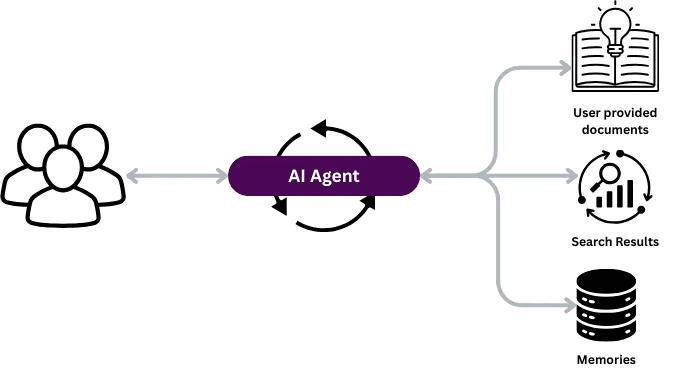
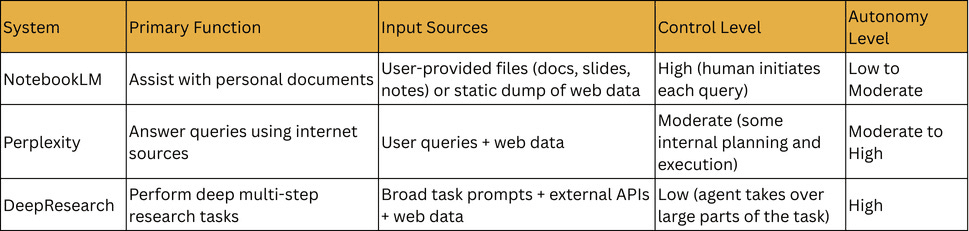
NotebookLM — Between Level 2 and Level 3.
High-control workflow agent.
Strong retrieval, limited autonomous decision-making.
Perplexity — Level 3 (maybe touching Level 4).
Plans queries, organizes sources, crafts answers.
DeepResearch — Strong Level 4.
Takes high-level goals, breaks down tasks, works iteratively with minimal guidance.
Try It Yourself
They all have free versions — experiment and watch for:
How much control you have
How much the system decides on its own
It’s a great way to sharpen your instinct for agent design.
Up Next
In the next part, we’ll wrap up the series:
Summarize what we’ve learned
Share best practices
Take a quick look at where agentic AI is headed