

Part 07
Memory in Agents
Over the past few parts, we’ve explored what makes agents act — from tools and RAG, to MCP and reasoning models.
Today, we shift gears to something that determines how well they act over time: memory.
Because here’s the baseline:
AI models don’t have memory inherently. They’re stateless by design. Every input is treated independently unless you architect memory into the system.
Why Memory Matters
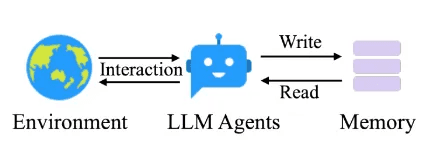
Image Source: https://arxiv.org/html/2502.12110v1
If an agent is helping you draft emails, summarize long threads, or manage workflows over days or weeks — it needs to remember:
The email format
The user's name
The tone to use
Sure, you could pass that information again and again with every prompt…
But wouldn’t it be better if the agent could retrieve the right information on its own, at the right time, from an external database?
That’s exactly where memory comes in.
“Wait… isn’t this just like Agentic RAG (Day 4)?”
Fair question — and you’re not wrong. Managing memory often looks a lot like doing Agentic RAG.
You:
Write structured or unstructured memories (facts, logs, past outputs)
Store them with metadata, tags, or embeddings
Retrieve the relevant slice when needed
Ground the model’s next action using that context
The difference:
RAG → Helps answer questions with knowledge.
Memory → Helps agents behave coherently over time.
Two Types of Memory in Agents
When designing real-world agent systems, you typically deal with two kinds of memory.
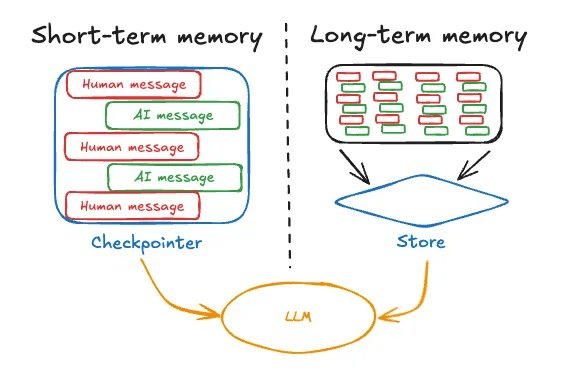
Image Source: https://langchain-ai.github.io/langgraph/concepts/memory/#what-is-memory
1. Short-Term Memory
Scoped to a single session or task.
Includes:
The conversation so far
Tools used
Responses generated
Documents retrieved
Think of it as a raw log of user–agent conversations.
LangGraph, Autogen, and similar frameworks treat this as part of the agent’s state.
But state grows fast, and most agents perform poorly when buried under irrelevant history.
Strategies to manage short-term memory:
Trim stale messages
Summarize the past into key points
Filter based on what’s still relevant
It’s a balancing act: context length vs clarity vs cost.
2. Long-Term Memory
Lives across sessions, days, weeks — even forever.
Helps agents remember:
Who the user is
How they prefer to interact
What’s already been done
Important past context
Examples:
“User prefers neutral tone”
“User name is X and stays in city Y”
“Invoice #123 has already been escalated”
More data ≠ better by default — it’s about retrieving the right thing at the right time.
Types of Long-Term Memory to Consider
Borrowing from cognitive science:
Semantic Memory → Facts and info (objective)
“User speaks English and prefers Excel files.”Episodic Memory → Past actions
“Agent already generated a summary yesterday.”Procedural Memory → Preferences (subjective)
“Avoid passive voice. Prioritize action items.”
Examples by use case:
User-facing chatbots → Semantic memory for personalization
Process automation agents → Episodic memory to avoid retries or loops
Adaptive assistants → Procedural memory to adjust prompts based on feedback
Key Design Questions
Before saying “we need memory,” ask:
What kind?
Why is it needed?
How will it be stored, retrieved, and kept fresh?
Managing Memory in Practice
Managing memory often feels like managing RAG.
The hard part? Deciding what to store and what to retrieve.
Stuffing more text into the agent input rarely helps — it often hurts performance.
You need to design memory intentionally, based on:
The agent’s job
What it needs to recall
When it should recall it
How to keep it useful over time
A Few Enterprise Examples
Customer Support Agent
Needs: recent support history, known bugs, user sentiment
Memory types: episodic + semantic
Sales Copilot
Needs: previous pitches, user objections, close status
Memory types: semantic + procedural
Compliance Auditor Agent
Needs: flagged items, prior exceptions, policy changes
Memory types: episodic
In all cases, it’s not about how much data you store — it’s about how relevant and structured it is.
And yes, I’ve said this painfully many times, but I’ll say it again:
Problem-first, always. The memory strategy, like tools or planning, depends entirely on the problem you’re solving.
Up Next
In the next part, we’ll talk about multi-agent systems — what they are, how they coordinate, and whether you actually need more than one agent at all.