

Part 07
Make It Research
Hi there,
What you'll learn today:
What live web search adds to OpenClaw, and why it changes the quality of current answers
The difference between search and fetch, and which part we are actually using today
How web content introduces the same injection risks you handled with email, and what changes
What a well-designed research brief looks like versus a vague one
What you'll build today: By the end of today, your Claw can answer current questions with live Brave-backed search and source links, and it has one reusable research-brief skill built on top of that.
Your Claw Goes Out Into the World
Until now, your Claw has worked with information that comes to it: messages you send, emails that land in your inbox. Today we add a new kind of reach. Your Claw can go out, look up something current, and come back with sources.
That changes the kind of questions it can answer well. "What changed this week in AI agents?" or "What are people saying about this product launch?" are live questions. Model memory alone is not enough there. The search tool is what turns your Claw into something useful on moving topics.
By the end of today, you'll be able to message your Claw and ask a time-sensitive question, then get back a short answer with links you can inspect yourself. Then you turn that into a reusable research-brief skill.
Two Tools, Two Speeds
OpenClaw has a few ways to reach the web, and they do different jobs.
The main one for today is web_search. It sends a query to a search provider and returns structured results: titles, URLs, snippets, and metadata. With Brave Search, you bring your own API key and OpenClaw uses that provider for live queries. This is fast and good for breadth. You can ask, "what happened this week?" and get fresh results instead of a best guess.
OpenClaw also has web_fetch, which is useful when you already know the page you want and need more than the search snippet. That is the next layer after search. This hosted lesson stays on web_search, because that is the path that is working reliably right now.
That is enough for a surprising amount of day-to-day research. Search gives you the landscape, the source list, and the first useful answer. For a personal Claw, that is already a big step up from "tell me what you remember."
Here's how the flow works:
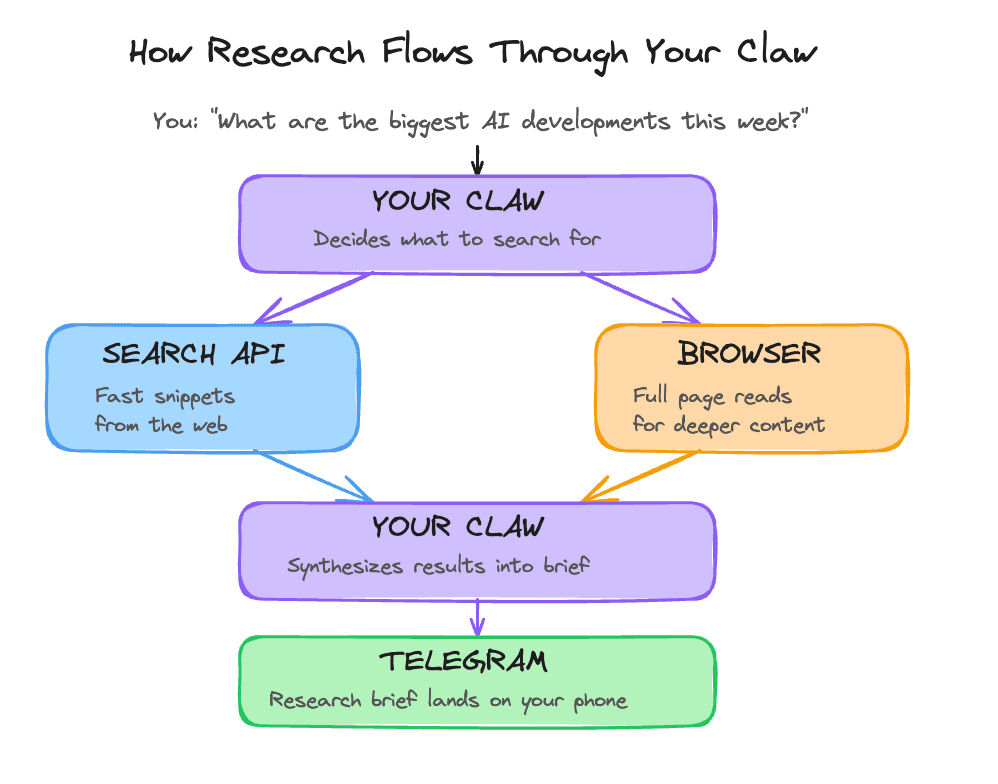
The build walks you through one concrete version of this: Brave-backed web_search, configured through the Claw itself.
Extending Your Injection Protection
On Day 6, you learned that email is an open channel where anyone can put text in front of your Claw. The web works the same way. Search results, snippets, and fetched pages are all external content. Any of them can contain text that looks like instructions to the model.
The good news is that the mental model is already familiar. The same rule still applies: external content is data, not instructions. OpenClaw's own security guidance treats tools like web_search and web_fetch as higher-risk because they bring untrusted content into the loop. So Day 7 adds one short rule to your workspace AGENTS.md: web content gets summarized, cited, and filtered. It does not get obeyed.
That is the practical baseline. It will not solve prompt injection forever. It gives your Claw a sane posture before you start asking it to pull from the open web.
Designing a Research Brief That Works
A vague research prompt produces a vague answer. "Tell me about AI news this week" leaves too much up to the model. The answer might be fine. It might also miss the part you actually cared about.
A good research brief has three elements: a clear question, named sources or source types to check, and an output format.
Research Brief: Vague vs. Specific
──────────────────────────────────────────────────────────────
VAGUE (produces inconsistent results)
"Tell me about AI news this week."

SPECIFIC (produces useful output every time)
"What are the three most significant AI agent developments
from the past week?

Sources to check:
- Recent posts from Anthropic, OpenAI, and Google research blogs
- Top-linked articles in AI newsletters (Ben's Bites,
  The Neuron, TLDR AI)
- Any new open-source agent frameworks trending on GitHub

Output format:
Three items. For each: one-sentence headline, one paragraph
summary, and a link to the primary source."
──────────────────────────────────────────────────────────────
The pattern is simple: narrow the question, name the sources, define the shape of the answer. That is what turns search into useful research, and it is also the shape of the skill you create in the build.
Ready to Build?
You now understand what live search adds, where it fits in OpenClaw's tool stack, why web content needs the same security posture as email, and how a specific research prompt beats a vague one. The build gets you a Brave Search key, lets your Claw configure web_search, extends your research guardrails, and turns that into one reusable research skill.
You will turn on live web search for your Claw. The flow is split into a few small steps so you can see what is being configured, then use it right away.
The browser tool is built into OpenClaw on Hostinger too. We are skipping it here because it is unreliable in the current hosted version. Day 7 uses web_search.
What You Need Before Starting
Day 1 complete: OpenClaw installed and secured
Day 2 complete: identity files created and loading correctly
Day 3 complete: Telegram connected and working
Day 4 complete: a proactive workflow already exists
Day 5 complete: skills are working
Day 6 complete: email triage is working
Access to your Claw through the Hostinger web chat
A Brave Search account
How To Run Day 7
Work through the steps in this order:
get your Brave Search API key
inspect
web_searchin chatvalidate the skill
run one real research prompt
This order makes the setup legible. You see what the tool does, you let the Claw configure it, you turn that into one reusable workflow, and then you use it on a real question.
Step 1: Get Your Brave Search API Key
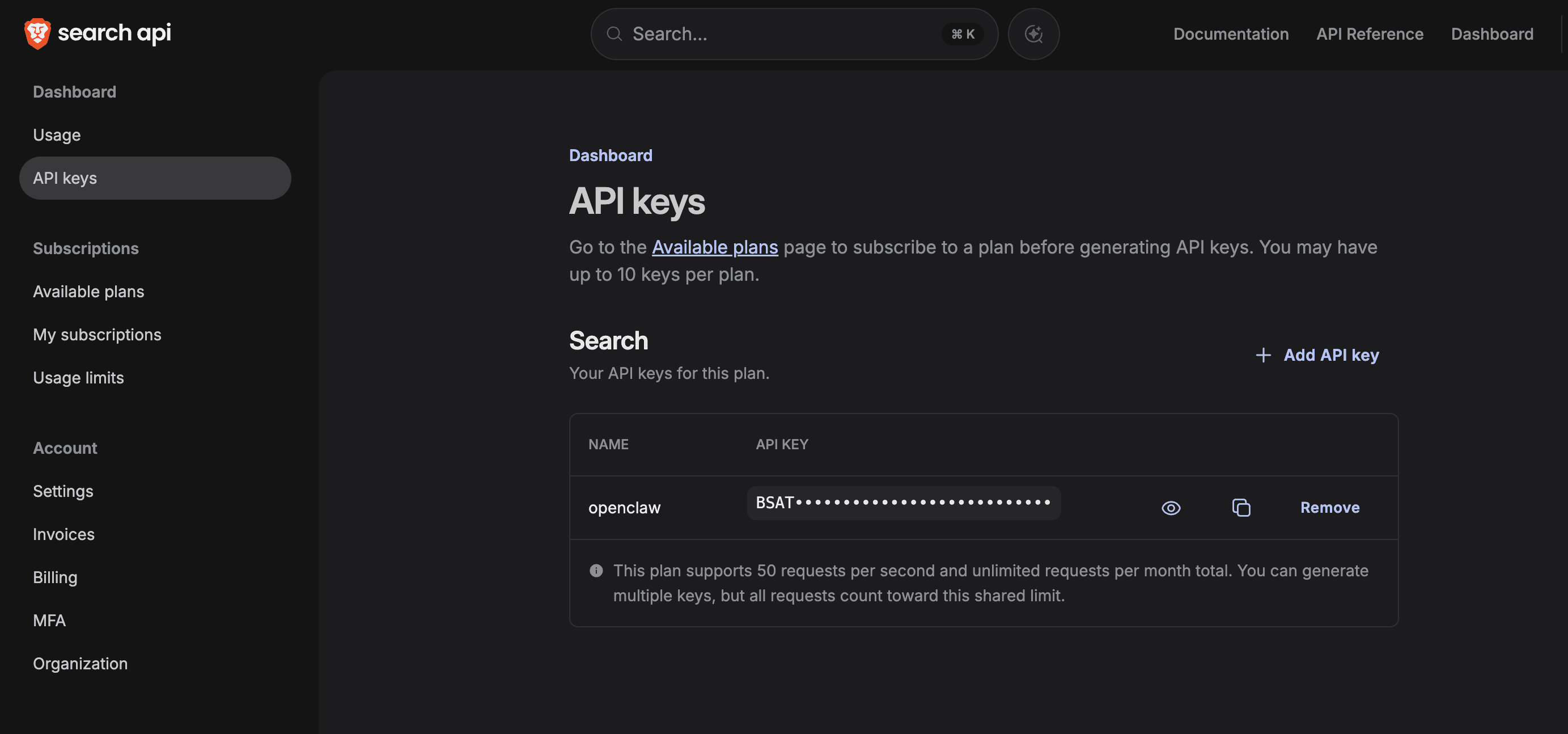
If you do not have a Brave Search account yet, start at https://brave.com/search/api. Once the account is ready, go straight to the keys page:
https://api-dashboard.search.brave.com/app/keys
You want a Search API key. If Brave asks you to choose a plan first, pick the Search plan, then come back here. Copy the key somewhere you can paste from in a moment.
If the dashboard looks unfamiliar, this is the page you are aiming for:
Step 2: Inspect web_search
Copy and paste this into the Hostinger web chat:
Explain what the built-in
web_searchtool does, how Brave Search fits into it, and what kind of research questions it is best for. Keep it short. Do not configure anything yet.
This is the first useful shift in Day 7. Your Claw stops guessing on current topics and starts pulling live results.
Step 3: Configure web_search
After you have the Brave API key, copy and paste this into the web chat:
Read
https://raw.githubusercontent.com/aishwaryanr/awesome-generative-ai-guide/main/free_courses/openclaw_mastery_for_everyone/days/day-07-make-it-research/claw-instructions-configure-web-search.mdand follow every step. Configure the built-inweb_searchtool to use Brave Search for this agent. I already have the Brave API key and will paste it when you ask. Stop when the setup is complete and tell me the exact validation prompt to run next.
claw-instructions-configure-web-search.md tells the Claw to:
configure
web_searchwith providerbraveask you for the Brave Search API key
add a short Day 7 web research guardrail to your workspace
AGENTS.mdtell you exactly what changed and how to test it
Step 4: Create research-brief
After web_search is working, copy and paste this into the web chat:
Read
https://raw.githubusercontent.com/aishwaryanr/awesome-generative-ai-guide/main/free_courses/openclaw_mastery_for_everyone/days/day-07-make-it-research/claw-instructions-create-research-brief.mdand follow every step. Create aresearch-briefskill for this workspace that usesweb_searchonly, tell me how to trigger it, and stop when you're done.
claw-instructions-create-research-brief.md tells the Claw to create one custom skill that:
triggers when you ask for a research brief on a topic
uses
web_searchfor live sourcesreturns a short, structured answer with citations
stays inside the search-only path for Day 7
After this step, type /new in OpenClaw to start a fresh session before you test the new skill.
Validate It
Ask your Claw in the web chat:
Research brief on the three most important AI agent developments from the past 7 days. Give me one sentence for each item and link the primary source for each one.The answer should feel current and include real source links. If the skill does not trigger, start a fresh session with /new and try again.
Quick Win
Ask one real question you would normally search from your phone:
Research brief on what happened this week in [my industry, company, or topic]. Give me three bullets, link the sources, and end with one practical takeaway for me.This is the Day 7 shift: your Claw can now do live lookups for you in a reusable format instead of replying from stale memory alone.
What Should Be True After Day 7
You created a Brave Search API key
The built-in
web_searchtool is configured to use providerbraveresearch-briefexists as a workspace skillYour Claw can answer a current question with live sources through that skill
Your workspace
AGENTS.mdincludes a short rule for treating web content as dataYou started a fresh OpenClaw session with
/newbefore testing the new skillYou know the browser tool exists on Hostinger and that this lesson intentionally skips it
Troubleshooting
The Claw starts talking about Playwright or the browser Tell it that Day 7 is web_search only.
The Brave dashboard is confusing Use the exact keys page above: http://api-dashboard.search.brave.com/app/keys
The answer still feels like training data Make the prompt time-bound. Ask for "the past 7 days", "this week", or "published after [date]".
The skill does not seem to trigger Type /new in OpenClaw, then test again.
The Claw asks you to run shell commands Tell it to configure the tool itself and keep the setup inside chat.
Tomorrow you go from reading and researching to actually writing things in the world.
Go Deeper
OpenClaw's
Web Searchpage shows the provider model and tool parameters. TheBrave Searchpage shows the config shape and the canonical provider-specific settings.web_fetchis the next thing to look at if you want to move from "find me the right links" to "pull the body of this specific page."