

Part 04
Make It Proactive
Hi there,
What you'll learn today:
How your server runs tasks while you sleep, and what daemons and schedulers are
What HEARTBEAT.md is and how it turns plain English instructions into scheduled behavior
What an isolated session is and why it matters for cost and reliability
What you'll build today: By the end of today, your Claw reaches out to you for the first time. An evening reflection arrives on your Telegram, unprompted, on a schedule you set. This is your Claw's first proactive behavior.
What Changes Today
If you've used Claude Code, Cursor, Codex, or ChatGPT, you may have noticed that the pattern is always the same. You open the tool, you type something, it responds. You close the window, it stops. Every interaction starts because you decided to start it. These are what the AI community calls reactive agents: they only act when prompted.
OpenClaw introduced a proactive agent: one that can also message you first. Your Claw can check in at a time you set, ask you questions, save your answers, and surface things it thinks you should know. You could be making dinner or lying on the couch. Your phone buzzes. It's your Claw, starting a conversation you did not initiate.
That ability to be proactive, to reach out instead of only responding, is a big part of what made OpenClaw take off. Today you're enabling it.
How Your Server Runs Things While You Sleep
Your VPS is a computer that never stops. Even when you're asleep, even when you forget it exists for a week, it's still running. To understand how your Claw will message you at 7pm without you being anywhere near a keyboard, it helps to know how that works.
Your computer (and your server) runs dozens of programs in the background right now that you never see. One checks for software updates. Another manages your Wi-Fi connection. Another indexes your files for search. These are called daemons: programs designed to run continuously without any human interaction. The name comes from Greek mythology, where daemons were helpful spirits that worked behind the scenes. In computing, same idea.
The concept is older than you might expect. Cron, the original Unix scheduler, has been running background tasks since the 1970s. Every time a server backs up its database at 3am, or cleans up old log files on a Sunday, or checks whether a website is still responding, cron is doing the work. It wakes up once per minute, checks a schedule file, and runs whatever is due. Over fifty years later, it's still the backbone of automated computing.
The OpenClaw gateway you set up on Day 1 is one of these daemons. It starts when your VPS starts, restarts automatically if it crashes, and runs 24/7 regardless of whether you're connected. On Day 3, it held a persistent connection to Telegram's servers, waiting for your messages. That connection is still open right now, as you read this.
The gateway also has its own built-in scheduler. Think of it like cron, but living inside the gateway itself. Every 30 minutes (or whatever interval you configure), this internal scheduler wakes up and checks whether any tasks are due. The tasks live in a file called HEARTBEAT.md.
OpenClaw also supports cron for jobs that need exact timing. Heartbeat is the repeating background loop. Cron is the exact scheduler. You'll use cron in the build, but it helps to understand heartbeat first because the same proactive model starts here.
What HEARTBEAT.md Is
HEARTBEAT.md is a plain markdown file that lives in your workspace. It contains a list of tasks written in natural language, each with a schedule. The gateway's internal scheduler reads this file on every tick and processes whatever is due.
The name fits. A heartbeat is rhythmic, automatic, and constant. It runs whether you're paying attention or not. That's exactly what this file does: it gives your Claw a pulse.
Here's the full loop:
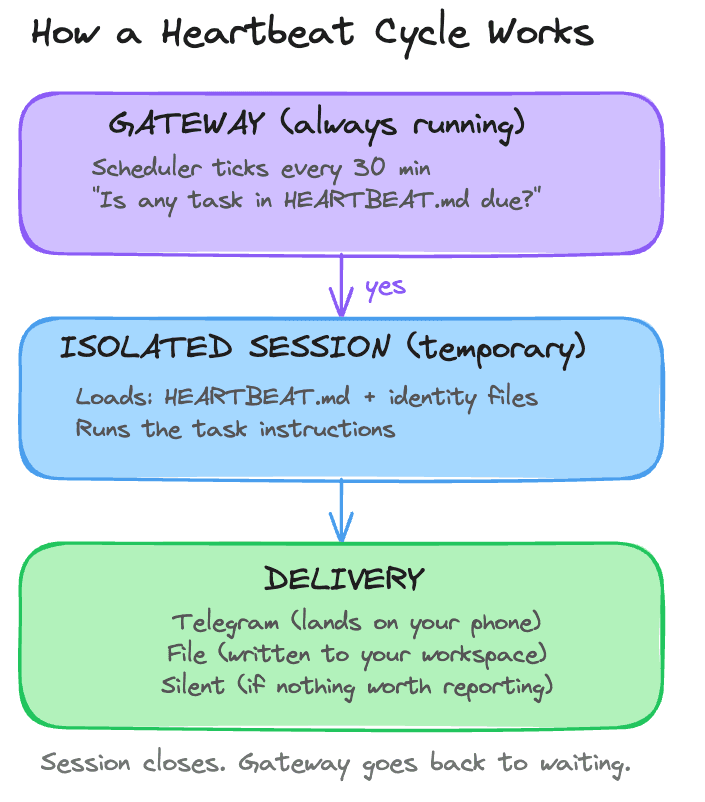
The gateway's scheduler ticks, reads HEARTBEAT.md, runs any due tasks, delivers the output, and goes back to waiting. If nothing is due, it skips the cycle entirely. You also configure active hours, so the scheduler only ticks during your waking hours. Outside that window, silence.
The tasks themselves are written in plain English. "Send reflection prompts to Telegram. Wait for replies. Save answers to today's journal file." The AI model reads those instructions and follows them, using whatever tools are available. It's a flexible instruction to an agent that can reason, adapt, and make judgment calls about how to carry it out.
Heartbeat is best when you want periodic awareness. "Check this every so often and decide whether anything matters" is a heartbeat job. If you need something to happen at an exact time, OpenClaw recommends cron instead.
The Clean Room
There's a design decision in the diagram above that's easy to miss: the words "isolated session."
When you're having a conversation with your Claw through Telegram, that conversation accumulates context. Everything you've discussed, the files you've referenced, the decisions you've made. That context is what makes the conversation feel coherent. Your Claw remembers what you said ten messages ago because it's all still loaded in the same session.
Now imagine a heartbeat task runs inside that same session. It would inherit your entire conversation history. Every message, every file, every tangent. The heartbeat would need to process all of that context just to check whether it's time to send you a reflection prompt. That's expensive: a single heartbeat run that loads weeks of conversation could cost $0.50 in tokens. At 48 runs per day, that adds up fast.
It also creates a quality problem. The heartbeat's output gets mixed into your conversation. Your chat history fills up with automated check-in logs. Context from your personal conversation leaks into a scheduled task that has nothing to do with it.
Isolated sessions solve both problems. Each heartbeat task gets its own clean room: a fresh session with no prior history. It loads only what it needs (HEARTBEAT.md and your identity files) and has no awareness of what you were discussing in your main conversation. When it finishes, the session closes. Your conversation stays untouched.
The cost difference is dramatic. An isolated heartbeat that finds nothing to report costs fractions of a cent. The same task running inside your main session costs orders of magnitude more. OpenClaw's documentation estimates that isolated sessions reduce heartbeat token usage by roughly 90%.
This also connects to something you set up on Day 2. The four identity files (SOUL.md, USER.md, AGENTS.md, MEMORY.md) reload from disk on every message turn. That same mechanism keeps isolated heartbeat sessions grounded. Even though the session starts fresh with no conversation history, it still loads your identity files. Your Claw's personality, your preferences, and its operating rules are all present. It's a clean room that still knows who it is and who you are.
The Daily Reflection
Here's one example of what a heartbeat task can do. Every evening, your Claw sends you a few reflection prompts:
Time to reflect on your day.

1. What went well today?
2. What felt harder than it should have?
3. What's one thing you want to carry into tomorrow?

Reply whenever you're ready. I'll save your answers to today's journal.
You reply via Telegram. Your Claw saves the entry to a daily journal file. Over time, those entries accumulate into something useful: a record of what you were thinking, what was hard, and what you wanted to change, all without ever opening a journaling app.
For today's build, you'll use cron instead of heartbeat because the reflection should arrive at the exact time you choose.
Ready to Build?
You now understand how your server keeps the gateway running while you sleep, what HEARTBEAT.md is and how the gateway's internal scheduler drives it, and why isolated sessions keep scheduled tasks cheap and reliable. The build enables HEARTBEAT.md, configures the daily reflection, and runs it once so you can see the output.
What You Need Before Starting
Day 1 complete: OpenClaw installed and secured
Day 2 complete: identity files created and loading correctly
Day 3 complete: Telegram connected and working
Access to your Claw through the web chat
Telegram on your phone
Step 1: Start the Setup in Web Chat
Copy and paste the following message into the web chat:
Read
https://raw.githubusercontent.com/aishwaryanr/awesome-generative-ai-guide/main/free_courses/openclaw_mastery_for_everyone/days/day-04-make-it-proactive/claw-instructions-create-daily-reflection-cron.mdand follow every step. Ask me only for the decisions you still need, create the cron job, and stop when you're done.
claw-instructions-create-daily-reflection-cron.md tells the Claw to:
reuse the context it already knows about you
propose a few reflection-question options instead of making you start from scratch
create a recurring cron job at your chosen time
bind that job to the current session
deliver the reflection explicitly to Telegram
At a high level, here is what you are doing:
choose when you want the reflection to arrive
pick the version of the reflection that feels most useful
let the Claw schedule it as a recurring cron job
see exactly how it is configured
This is the first day your Claw reaches out on its own, on a real schedule.
What the Claw Should Ask You For
Keep this simple. The Claw should mainly need two decisions from you:
what time you want the reflection
which reflection option you want
It should reuse the timezone and other context if it already has them, then create the cron job for you.
What You Should See
Once the cron job is created, the Claw should clearly tell you what it set up: the schedule, timezone, session target, and Telegram destination.
If you want to inspect or run it manually, you can also use the Cron Jobs tab in Hostinger:
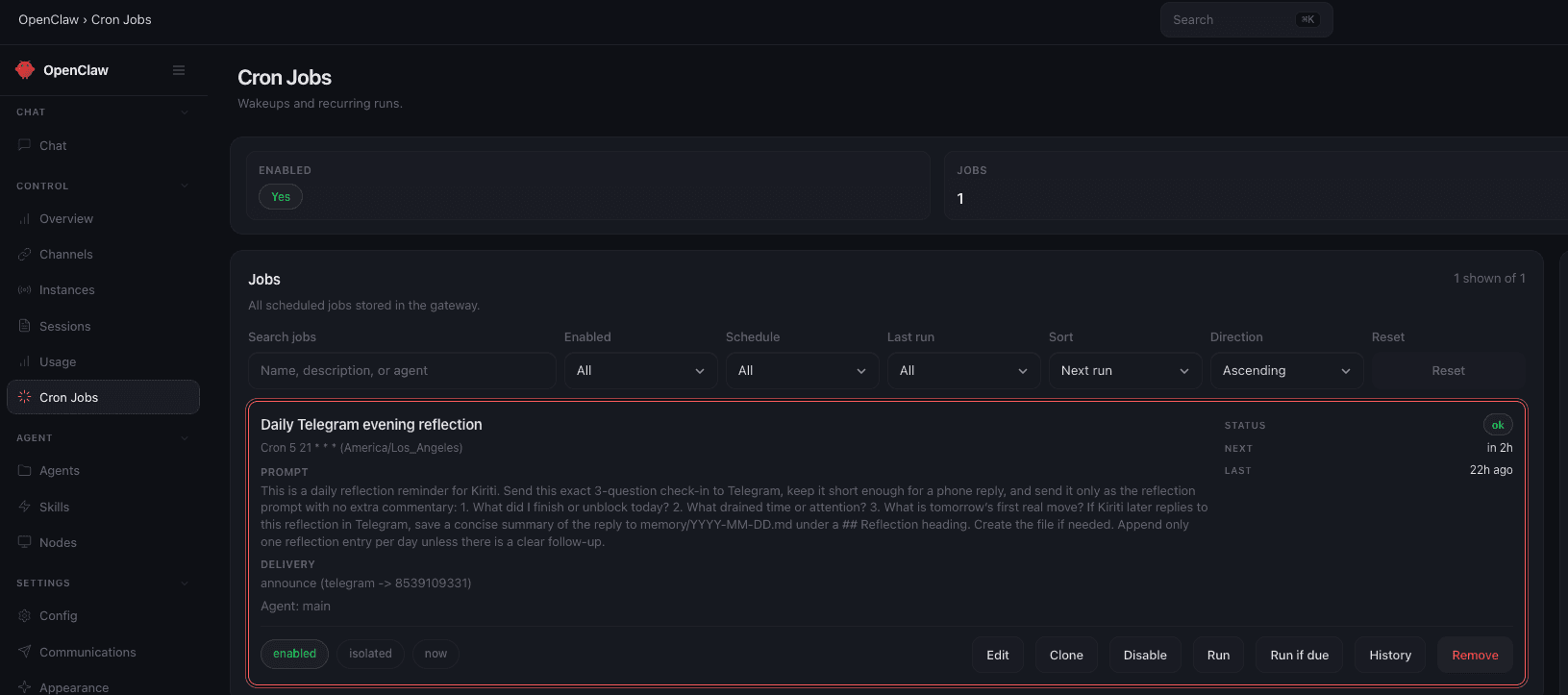
If anything feels unclear while this is happening, ask your Claw in the web chat and let it keep guiding the setup.
Validate It
This should be simpler than the quick wins. Ask your Claw in the web chat:
Tell me the cron job you just created: the schedule, timezone, session target, and where it delivers.The answer should clearly name the daily time, your timezone, the session binding, and the Telegram destination.
Quick Win
Now that your Claw can reach out first, shape that behavior into something you will actually want to receive.
Based on what you know about me so far, suggest one other exact-time cron job worth adding next. Keep it lightweight and useful.This is where your Claw stops feeling like a chat window and starts feeling scheduled into your day.
What Should Be True After Day 4
A recurring cron job exists for the daily reflection
The schedule matches your chosen daily time
The job timezone matches your timezone
The job is bound to the current session
delivery.channelis set totelegramdelivery.tois set to your Telegram recipient/chat ID
Troubleshooting
No message arrives when you try a manual run Ask the Claw to check the cron job's delivery target and confirm it used the job itself for the test, not a separate one-off message.
The reflection arrives, but your reply is not saved Ask the Claw to confirm the job is bound to the current session and that the reflection prompt told it to save your next reply to today's journal file.
The job runs at the wrong time Ask the Claw to inspect the cron expression and timezone together. Most timing mistakes come from one of those two being wrong.
You start getting duplicate reflections Ask the Claw to list the active cron jobs and look for an older reflection job that should be disabled or removed.
Go Deeper
The heartbeat interval is configurable. Community guidance: 30 minutes is a good default for personal use. Five-minute intervals make sense for monitoring critical systems but cost more in API calls. Keep HEARTBEAT.md under 5-8 tasks; beyond 20, processing slows down and costs inflate.
The daemon architecture means your Claw survives reboots and weeks of inattention. If the gateway process crashes, the operating system restarts it automatically within seconds. Your laptop sleeps when you close it; your server does not.
OpenClaw also supports precise cron-style scheduling for advanced use cases (exact times like "9am sharp every Monday" with per-task model selection). The official docs cover this at docs.openclaw.ai/automation. For most users, HEARTBEAT.md handles everything you need.