

Part 03
What Are Tools in AI?
In the previous part, we talked about different types of agents, from rule-based to fully autonomous, and how the right level of autonomy depends on the problem you're solving.
But here's a shared trait across all agent types, no matter how simple or complex:
They rely on tools to perform actions.
What Are “Tools” in AI?
In the context of agentic AI, tools are external capabilities the LLM can invoke, things like:
APIs
Database queries
Internal services
Third-party systems
Internal functions written in code
They turn the LLM from something that just talks into something that can act.
Remember, LLMs on their own are stateless, have no access to real-time systems, and can’t take action.
But Give Them Tools, and They Can:
Fetch data from your internal systems
Trigger events (e.g., send an email, create a JIRA ticket)
Access structured data like calendars, dashboards, or CRMs
Run pre-written logic based on business rules
This is how generation turns into execution.
Why Tools Matter
They unlock execution
Without tools, your agent is just an assistant that makes suggestions.
With tools, it can complete workflows end-to-end.They increase precision
Rather than hallucinating, the LLM can ask the right system directly —
“What’s the actual order status?” instead of making up a delay reason.They let you control risk
You define what’s exposed. The LLM can’t do anything outside of the tools you register.They enable composability
If you want to combine your CRM, calendar, and email stack into one assistant,
you can expose each of those as tools and let the LLM orchestrate them.
Step-by-Step Example: End-to-End Agent Task Using Tools
Task:
“Inform a customer that their order is delayed and offer a new delivery time.”
Here’s how the system works with tools:
Input — A human types:
“Hey, can you let John know his order is delayed and reschedule it for tomorrow?”
Planning — The LLM breaks it down:
Check the order status
If delayed, check delivery slots
Draft an email
Send the email
Log the interaction
Tool calls:
get_order_status(order_id=12345)
get_available_slots(date=today+1)
send_email(to=john@example.com, content=...)
log_event(event_type="reschedule", status="completed")
Text generation — The LLM composes the message:
“Hi John, just letting you know your order has been delayed. We’ve rescheduled it for tomorrow. Thanks for your patience.”
Execution — The system runs the actions, logs the output, and optionally sends a status update to a dashboard.
How This Works (Visual)
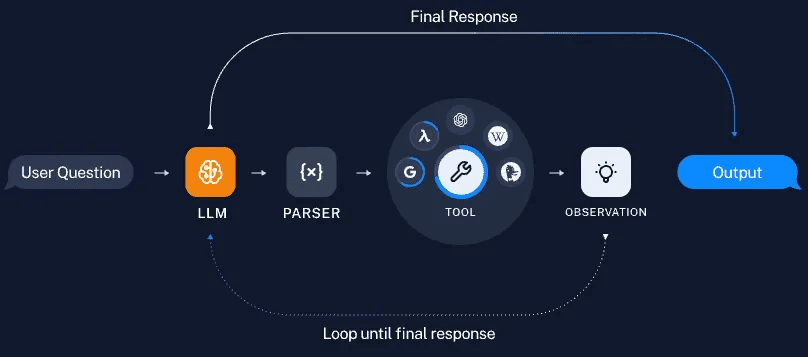
Here’s what’s happening:
The user asks a question or gives a task.
The LLM understands what needs to be done and plans its next step.
A parser converts the LLM’s idea into a structured format (like
get_order_status(order_id=12345)).The agent calls the right tool — API, database query, or internal function.
The tool returns a result — this is called an observation.
The LLM looks at the result, decides what’s missing or what comes next.
This loop continues until it has enough to generate the final answer or complete the task.
The LLM is using each tool’s result to guide its next decision.
Key reminder:
The LLM itself is still just generating text.
That text is structured into tool calls, executed externally, and the results are fed back into the LLM — creating a loop of reasoning, action, and reflection (a.k.a. an agent).
This structure is used by frameworks like LangChain, CrewAI, AutoGen, and even custom orchestration setups in production teams.
What Makes a Tool Usable by an LLM?
To register a tool with an agent system, you typically define:
Name (e.g.,
create_meeting)Description (so the model knows when to use it)
Input parameters (and types)
Output structure (so the model can use the result)
This metadata is what allows the LLM to reason about which tool to use and how.
A Note on Parsing and Structured Outputs
The parser plays a key role in converting the LLM’s response into a structured tool call — something the system can reliably execute (like get_order_status(order_id=12345)).
But in many modern setups, you don’t always need a separate parser.
Most popular LLMs, especially those designed for tool use, can directly produce structured outputs — like JSON or function calls — that can be consumed by your backend as-is.
Similarly, well-designed tools return structured data, making it easier for the LLM to reason about what to do next.
The structure on both sides (input and output) is what makes agent loops robust, traceable, and production-grade.
The Takeaway
A lot of this will feel familiar if you've built or worked with APIs before.
But if you're not from that world, don’t overthink the wiring.
Just remember this:
AI models on their own can understand and generate.
When they’re connected to software, tools, APIs, and internal systems — they can actually do things.
In the next part, we’ll learn about Retrieval-Augmented Generation (RAG) — what it is, when to use it, and how it fits naturally into agentic pipelines as a memory or context layer.